




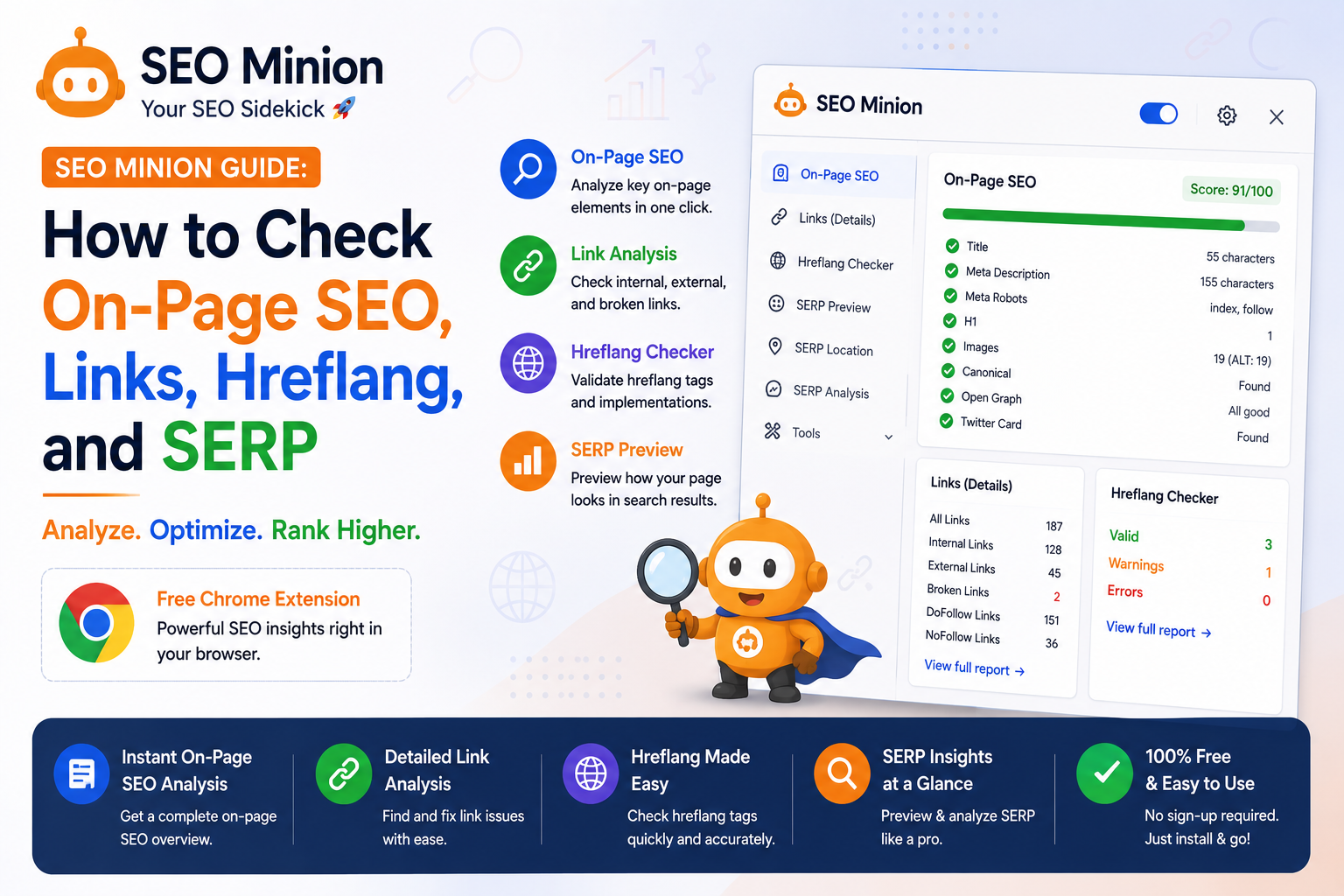
If you’ve ever felt like SEO is an endless puzzle with missing pieces, you’re not alone. Optimizing your website shouldn’t feel like a never-ending scavenger hunt. That’s where SEO Minion comes in. It’s a tool that can help you tackle the everyday SEO tasks that clutter your to-do list. From on-page analysis to link inspection, SEO Minion offers practical solutions without overwhelming you with jargon or complicated features. Ready to make your SEO tasks manageable and actually see results? Let’s get into how SEO Minion can change the way you handle SEO.
What is SEO Minion?
SEO Minion isn’t a magic wand for search rankings, but it sure makes your SEO chores easier. It’s a Chrome extension that lets you handle vital SEO tasks without jumping between tabs. Need to check broken links? This tool’s your buddy. View on-page data without squinting at code? No problem. You can even switch between Google search locales, like jumping from the U.S. to the U.K., to see different rank results. It’s a practical sidekick for your SEO journey.
ALSO READ: Mangools vs. the Competition: A Practical Review

Key Features of SEO Minion
Imagine spotting a broken link on your website while sipping your morning coffee. Annoying? Sure. But with SEO Minion, you can catch these issues before they frustrate visitors. The tool’s on-page analysis checks for overused tags, readability hiccups, and more. Want to see how your page stacks up on search engines? Use the SERP preview. It mimics actual search results, ensuring your page isn’t just there, but shines. Critical for saving time and boosting your site’s effectiveness.

How to Use SEO Minion Effectively
Remember the time you spent an hour finding broken links? You don’t need that headache anymore. Set up SEO Minion in your browser. It’s a simple extension, but powerful. Start by checking on-page SEO data. Title tags and meta descriptions, for instance. The extension shows them right on your screen. Want to check broken links? Click a button, and voila—errors pop up instantly. Use it daily to save time and boost your site’s performance. Your productivity just spiked.
Frequently Asked Questions
Is SEO Minion free to use?
You won’t pay a dime to use SEO Minion because it’s free. It’s available as a browser extension, so just head over to the Chrome Web Store or Firefox Add-ons and add it to your browser in a couple of clicks.
Can SEO Minion improve my website’s ranking?
SEO Minion itself won’t magically boost your site’s ranking, but it equips you with tools to analyze and optimize. For example, you can perform an on-page SEO analysis to fix issues that might be holding your site back.


Final Thoughts
Mastering SEO Minion boils down to consistently using its features to boost your website’s visibility. The key takeaway? Regularly analyze your site’s backlinks and keyword rankings; these insights drive targeted improvements. Now, try using the SERP preview tool to see how your pages appear in search results. Make adjustments today for better clicks and engagement tomorrow.